Roadmap From Side Project to AI Company in 7 Stages
A seven-stage roadmap from side project to AI company. Each stage has one question to answer and one thing to produce before you move on.
You want a roadmap from side project to AI company, and you want it without the hype. This post gives you seven stages, in order. Each stage has one question to answer and one thing to produce before you move on. Skip a stage and you usually pay for it later.
The stages follow the same path the courses at Age of AI Entrepreneur follow: find a problem, build small, test, launch, price, measure, and grow. Nothing here promises income or funding. It is a way to make fewer expensive mistakes.
Most AI side projects never become companies, and most stall for plain reasons. They start from a cool model, not a real problem. They never get shown to a stranger. They have no price. They have no way to reach customers. Or they work on the demo and fail on the tenth real input.
Each stage below targets one of those failures. The goal is not to build more. It is to learn something true at each step, as cheaply as you can.
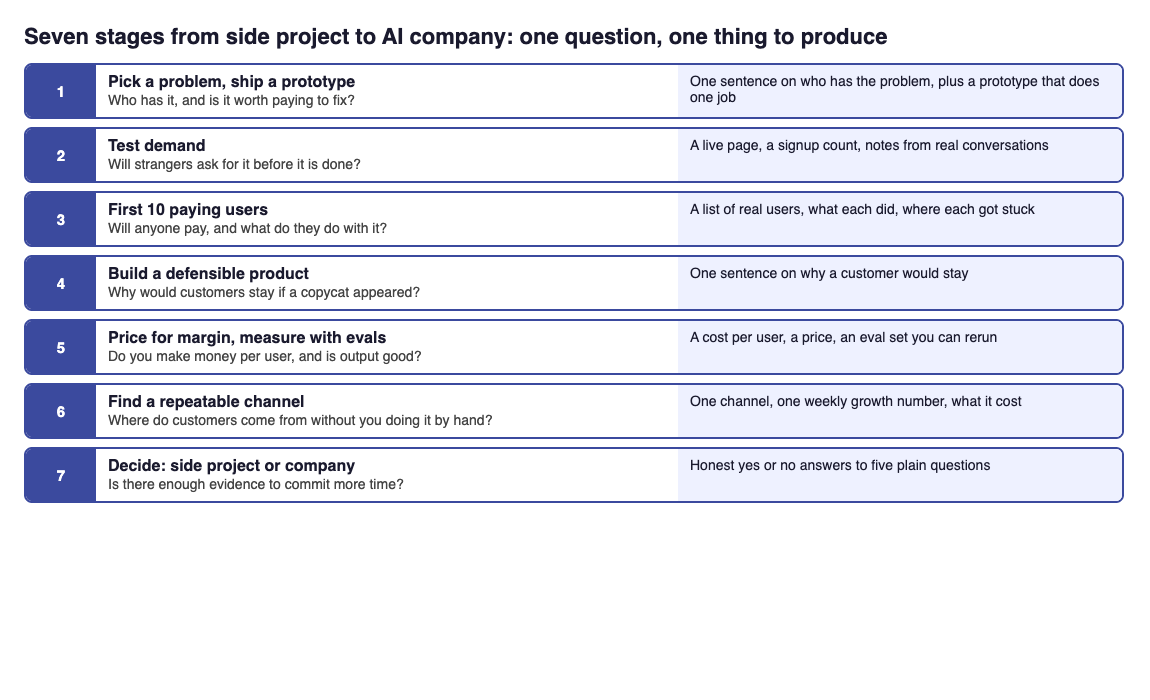
Stage 1: Pick a painful problem and ship a small prototype
Question: who has this problem, and is it worth paying to fix?
Start with a problem, not a model. Good ideas often come from work you already know: a task you or people near you repeat, dislike, and do badly. The Basic course Business Basics for Builders opens with this idea in its lesson Problems Worth Paying For. The Intermediate course Finding AI Opportunities goes further, with a lesson on where good AI ideas come from.
Then build the smallest thing that touches the problem. A prompt-powered micro tool is a good first build. Write one prompt that does one job, put a simple form in front of it, and try it on real examples.
A worked example (invented, to show the steps): you notice that freelance designers spend an hour a week rewriting client feedback into a clear to-do list. Your prototype is a prompt that takes pasted feedback and returns a numbered task list with open questions flagged. It takes an afternoon. It is not a company. It is a way to find out if the job is real.
Produce: one sentence naming who has the problem, plus a prototype that does one job.
Stage 2: Test demand with a landing page and waitlist
Question: will strangers ask for this before it is finished?
A prototype that you like proves little. A page that makes a stranger give you their email proves more. Write a plain page that says who it is for, what problem it removes, and what happens next. Add a waitlist form. Then count who signs up and who you can talk to.
We cover the full method in how to test demand with a landing page and a waitlist. The app also has this as a hands-on project: Project 1: A Landing Page and a Waitlist.
Pair the page with conversations. The lesson Talking to Customers Without Fooling Yourself is about asking in a way that does not lead people to say what you want to hear. Ask about the last time they had the problem and what they did about it. Do not ask if they would use your idea.
Produce: a live page, a signup count, and notes from a handful of real conversations.
Stage 3: Get your first 10 paying users
Question: will anyone pay, and what do they do once they have it?
Do this by hand. Message the people from your waitlist and the people you talked to. Offer to set it up for them. Watch what they do. The course Launch, Price and Get Paid has a lesson called Launching and the First Ten Customers, and the course frames it as winning the first ten by hand.
Keep the product small. The lesson The MVP and the Build-Measure-Learn Loop frames it well: ship the smallest thing that teaches you something, then measure what happened.
If you can, automate one boring step that you keep doing by hand. Project 3: Automate One Boring Workflow is built for that moment. Do not automate before you know which step matters.
Produce: a short list of real users, what each did, and where each got stuck.
Stage 4: Build a defensible product, not a thin wrapper
Question: if anyone can call the same model, why would customers stay?
This is the stage that separates a feature from a company. If your product is a prompt and a text box, a competitor can copy it with little effort. Read is my AI startup just a thin wrapper around ChatGPT and test yourself honestly.
The Distribution and Moats course has a lesson, What Moats Survive When AI Is Cheap, and another on the risk of Building on Someone Else's Model. Use them as a checklist. Ask where your edge lives: your own data, a workflow customers rely on, or a relationship nobody else has.
If your edge involves giving the model your own information, learn retrieval. Our plain explainer on retrieval-augmented generation is a good start, and the app covers it in Giving Models Your Data: Retrieval.
Produce: one written sentence on why a customer would stay if a copycat appeared.
Stage 5: Price for margin and measure quality with evals
Question: do you make money on each user, and do you know your output is good?
AI products have a cost on every request. The lesson Model APIs, Tokens and What a Request Costs explains why. Work out what a typical user costs you per month, then set a price that leaves room. Our post on how to price an AI product without losing money per user walks through it. The lessons Revenue, Costs and Unit Economics and Pricing AI Products cover the same ground in the app.
Quality is the other half. Judging by eye stops working as the examples pile up. Build a set of real inputs with known good outputs, and run it every time you change a prompt or a model. We explain the idea in what are LLM evals and why your AI product needs them. The Advanced course Evals: Shipping AI That Works has lessons on building an eval set and running AI in production.
A small example (invented): take 30 real feedback pastes from users of your design tool, write the task list you would expect for each, and check each prompt change against all 30. If a change fixes three and breaks five, you see it before your users do.
Produce: a cost per user, a price, and an eval set you can rerun.
Stage 6: Find a repeatable distribution channel
Question: where do new customers come from that does not depend on you doing it by hand?
Your first ten came from effort. Now you need a channel that can repeat. Pick one place where your customers already spend time, try it for a set period, and measure what it brings in. Our guide to how to find the right distribution channel for a startup shows how to compare options. The lesson Distribution: Getting in Front of Customers is the in-app version.
Then track growth as a number. What weekly growth rate should an early startup aim for helps you set a target. The lesson Growth: The Number a Startup Lives By explains why one number beats many.
Produce: one channel, one weekly growth number, and a record of what the channel cost you.
Stage 7: Finish the roadmap from side project to AI company
Question: is there enough evidence to commit more of your time?
There is no fixed rule, and no course can give you personal legal, tax or investment advice. But you can ask plain questions:
- Do paying users keep using it?
- Do you earn more per user than it costs to serve them?
- Do your evals show quality holding steady?
- Is there a channel that brings customers without you doing every step?
- Could a copycat with the same model take them?
If most answers are yes, the project is acting like a company. The Advanced course Scaling an AI Company covers The Economics of AI Companies and Tiny Teams, Huge Leverage, which is about getting a lot done with very few people. Its last lesson, Your Roadmap: From First Project to Company, is where you write your own plan.
If the answers are mostly no, that is useful. Go back one stage and fix the weakest one.
Frequently asked questions
How long does it take to go from side project to AI company?
There is no honest fixed number. It depends on how fast you learn from real users at each stage, so judge by evidence, not by calendar time.
Do I need to code to follow this roadmap?
Not to begin with. The first builds in the app range from no code to a little code, such as a landing page, a prompt-powered micro tool and an automated workflow.
Should I build evals before I have users?
Start small. A set of real examples with known good answers is enough, and it grows as real users show you what breaks.
What if my idea turns out to be a thin wrapper?
Treat it as a finding, not a failure. Look for an edge such as your own data, a workflow customers depend on, or a niche you know well, and test that next.
Get started
The Age of AI Entrepreneur app covers every stage above in short lessons, 12 courses and 36 lessons in all, at three levels from Basic to Advanced. It teaches; it does not build or run a business for you, and it makes no promise of income or results.
Every lesson is free with an account. Start learning with Age of AI Entrepreneur: sign in on the home page and take your first short lesson today.